How to protect your e-mails with PGP keys and thunderbird! 
Requierments:
Steps:
- Open thunder bird app! You need to be sign up your gmail or outlook account (try for gmail probably cuz you are using it).
- Go to Account settings (right upper corner).
- Click on your email name and find End-To-End Encryption.
- Then Add Key…
- Create a new OpenPGP Key.
- You can leave default which mean that your key will expire after 3 years and you will need to create a new one and send it to your friends!
- Generate key and Confirm.
- You can see all of your PGP keys in OpenPGP Key Manager.
- Now go back to your e-mail page (left upper corner) and select + New Message
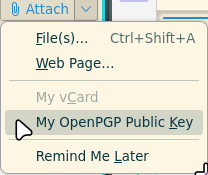
- First you need to select arrow down [⬇] attach (left upper corner) and select My OpenPGP Public Key.
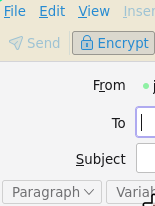
- Write email a person you wanna give your public key a subject that you are sending a PGP key to them and select Encrypt
- Send.


Sources:
- How Send An Encrypted Email from Thunderbird to ProtonMail - Invidious

- How Send An Encrypted Email from Thunderbird to ProtonMail - Youtube

- WesleyAda - this dude youtube channel